Blazingly fast YouTube on NixOS + T480
This small tutorial is for anyone with really poor performance on YouTube playback, specifically for T480 + NixOS + Firefox.
The T480 has an Intel i5-8350U with a UHD 620 iGPU. This GPU can hardware decode VP9 and H264 but NOT AV1. By default, YouTube will serve AV1 Firefox falls back to CPU decoding = poor performance.
Enabling hardware acceleration
Using nixos-hardware this is pretty simple.
Firstly, as per the nixos-hardware documentation add the channel.
$ sudo nix-channel --add https://github.com/NixOS/nixos-hardware/archive/master.tar.gz nixos-hardware
$ sudo nix-channel --update
Then add the following to your configuration.nix’s imports
# imports = [
   <nixos-hardware/lenovo/thinkpad/t480>
#  ./hardware-configuration.nix
#];
Rebuild the configuration using
$ sudo nixos-rebuild switch
Now, reboot the system to ensure all variables are loaded.
To test that the iGPU drivers are working run the following command and if you see something like then you are good to go.
$ nix-shell -p libva-utils --run vainfo
# ...
vainfo: VA-API version: 1.22 (libva 2.22.0)
vainfo: Driver version: Intel iHD driver for Intel(R) Gen Graphics - 25.3.4 ()
vainfo: Supported profile and entrypoints
      VAProfileNone                   :	VAEntrypointVideoProc
      VAProfileNone                   :	VAEntrypointStats
      VAProfileMPEG2Simple            :	VAEntrypointVLD
      VAProfileMPEG2Simple            :	VAEntrypointEncSlice
    # VAProfileMPEG2Simple            :	VAEntrypointVLD
Enabling Hardware Acceleration on Firefox
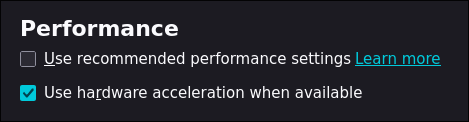
To enable hardware acceleration all we need to do is go to the Performance section in Firefox and check these boxes.
Disabling AV1 Codec
Now we can disable AV1 media codec support so YouTube can send us either VP9 or H264 only.
By going into about:configs in Firefox, set the following configs
media.av1.enabled -> false
media.hardware-video-decoding.force-enable -> true
Right-click on a YouTube video and choose Stats for Nerds. Check the codec for either vp09 (VP9) or avc1 (H264), and not av01 (AV1).
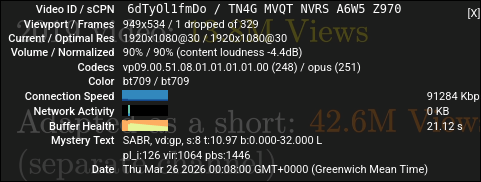
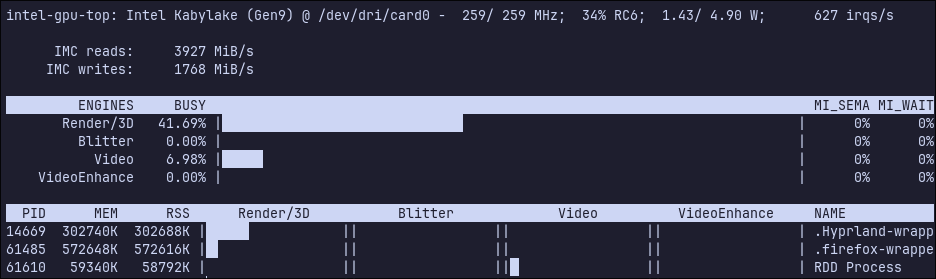
You can also check the iGPU usage during video playback.
$ nix-shell -p intel-gpu-tools --run "sudo intel_gpu_top"